

How To Pay Electricity Bill Through Esewa
How To Pay Electricity Bill Through Esewa Simple you can downlaod esewa application from your andriod and iphone device. From your mobile apps i will be share step by step. From website i will be share it step by step through it here.
From Mobile Application Follow This Step By Step
- Simple login your esewa ID And Password
- After you login then you see on dashboard to shows eletricity bill option
- Click on that then page will be open it.
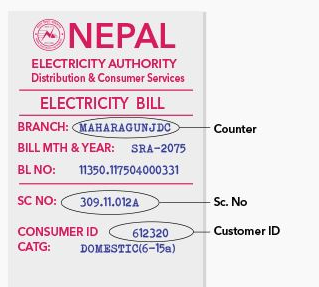
- After then you can search your counter to pay bill.
- You can look into your bill to find Sc . No And Customer ID.
- After you select counter name and sc no and customer ID.
- Then you continue you process
- Next Page will be open it Then you seen a amount to pay it.
- You can type a mobile number to which want people did you pay it
- After you type mobile number then click to continue buttom.
- Then your payment will be success on it.
From Website to pay Eletricity Bill Step by Step
- First goto this link http://esewa.com.np/
- Type your Esewa ID And password
- Ater you type Esewa ID And Password the page will be open
- Then you scroll to see on left hand side
- You can seen Eletricity/ water bill payment option there.
- Click on there then you click on eletricity buttom it will be open next page
- Then Continue as 1st paragraph of 4 to 11 same you can type it there.
One things you can remember it that you can pay a eletricity bill from 10 a.m to 12pm at nepali time which that period you can pay from esewa ID. This is online payment of nepal which people will pay bill from own home.
Like!! Really appreciate you sharing this blog post.Really thank you! Keep writing.
thank you